
- Store
- Products
- Downloads
- Resources
-
 For Mac
 For Windows
 Home » AVCHD MTS/M2TS Tips » AVCHD Footages to Premiere Elements
Convert 1080/50p AVCHD Footages to MPEG-2 for importing to Adobe Premiere Elements
If you are editing your Full HD 1080p MTS files with Adobe Premiere Elements, including Elements 7/8/9/10, you should be familiar with the problem listed below:
I'm currently looking into buying an HD camcorder, and editing software to go with it. I'm considering getting a camcorder which can record in 1080/50p for future-proofing, however I see that Premiere Elements doesn't currently support 1080/50p editing. I was wondering whether I could sensibly shoot video in 1080/50p for archiving, but convert it down to either 1080/50i or 720/50p prior to importing into Premiere? Is there a suitable intermediate input format which Premiere supports and which wouldn't result in a significant loss of quality due to the extra transcoding step?
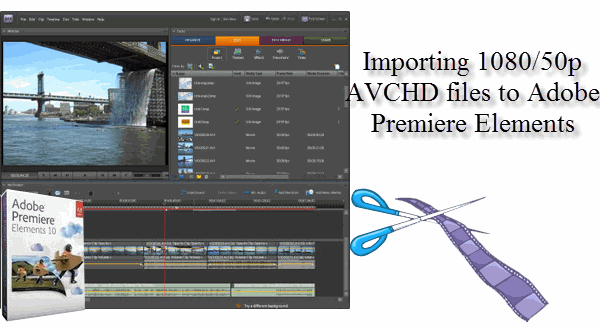
As we all know, Adobe Premiere Elements can not read the 1080/50p AVCHD footages. There are two solutions for you. The first one is that you can shoot in 50i, which will work fine with Premiere, but it seems meaningless that you spend much more money on a Full HD camera/camcorder. The other one is to convert 1080/50p AVCHD footages to MPEG-2, the format which is mostly compatible with Premiere Elements and great for editing in all the Adobe video editing products. For most of Premiere Elements editors, they prefer the second way since only if a powerful MTS to MPEG-2 Converter can be found, the importing problem can be solved and they can also get the High-definition recordings.
If you are worried that the transcoding process from AVCHD to MPEG-2 will reduce the quality of your recordings, the professional AVCHD to MPEG-2 Converter will be the right converting tool you are looking for. It is highly recommended for two main reasons. Firstly, it is capable of converting 1080/50p MTS/M2TS files with original quality and you will get no quality loss after the conversion process. Secondly, you can save a lot of time in that the MTS Converter, supporting NVIDIA CUDA & AMD APP(ATI Stream) acceleration technologies, converts MTS files at 3X~5X faster speed than other converters. Thus, the MTS Converter for Adobe Premiere Elements is your best choice.
 (Note: Click here for OS X 10.5)
Guide: Convert AVCHD footages to MPEG-2 for importing 1080/50p files to Premiere Elements
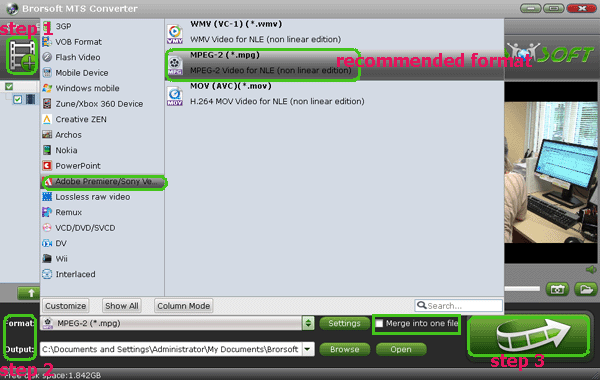
Step 1: Click the MTS Converter to free download and install it on your PC. Run it and import your 1080/50p MTS files to it.
Step 2: Hit the Format box to get the dropmenu of output options, among which we recommend Adobe Premiere/Sony Vegas --> MPEG-2(*.mpg) as output format.
Tip: If you want to get your MTS files converteed with 50fps as Frame Rate, please select WMV (VC-1) (*.wmv) as output format. It is also great for editing in Premiere Elements.
Step 3: Click the Settings button on the main interface to adjust video and audio parameters, including the Bitrate of Video and Audio, the Codec of Video and Audio, Video Size, Sample Rate, Frame Rate, Audio Channels, etc., to get the best quality.
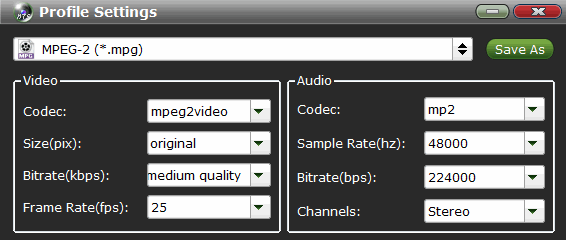
Tip: For editing MPEG-2 files in Adobe products, we recommend 25fps as frame rate, and 1920*1080 as video size.
Step 4: Start converting/transcoding 1080/50p AVCHD files to MPEG-2 by clicking the "Convert" button on the main interface.
Tips on MTS Converter
1. If you want to join the imported clips into one for easy editing, please tick the box "Merge into one" on the main interface.
2. Crop: Edit --> Crop and you can get the imported videos cropped as you want.
3. Get smaller videos: Go to the Profile Settings page and change the parameters from 1920*1080(original) to 1440*1280.
4. Auto shutdown: Click Option and tick the box “Shut down the computer after conversion” before conversion starts.
In addition, the MTS Converter is not only good at converting MTS files to MPEG-2 for Adobe Premiere Elements, but also is great for making 1080/50p AVCHD footages in Adobe Premiere Pro, Avid Media Composer, Adobe After Effects, Windows Movie Maker, Magix Movie Edit Pro, etc. If you are in need of solving the incompatibility problem of MTS footages and other Wins editing softwares, please go to Brorsoft's MTS Converter to get more info.


More Related Guides:
How to Convert and Merge MTS files
Import M2TS video to Sony Vegas Pro
How to Import AVI files to Premiere Pro
Get FCP work with Single .mts,.m2ts files
Transcode 1080p AVCHD Files to Adobe Premiere Pro
Convert Sony NEX-VG10 AVCHD to Premiere Pro CS3
Convert Sony HDR-CX740/CX740VE MTS to Premiere Pro
Importing MTS from Sony DSC-RX100 to Adobe Premiere Pro
Convert Panasonic HC-X900 AVCHD to AVI/MPG for Premiere Pro
Related Products
MTS/M2TS Converter


Useful Tips
- Convert MTS to MOV Mac
- Convert MTS to MP4
- Play MTS in Plex Server
- Join multiple MTS files
- Import MTS clips to FCP
- Import MTS clips to AE
- Convert MTS to Sony Vegas
- Convert MTS to Andorid
- Convert 3D AVCHD MTS
- Trancode MTS for Premiere
- Transcode MTS to Pinnacle
- Convert MTS to Camtasia Studio
- Convert MTS to Davinci Resolve
- Convert M2TS to Sony Movie Studio
- Convert MTS to Windows Movie Maker
Social Connection

Copyright © 2019 Brorsoft Studio. All Rights Reserved.