
- Store
- Products
- Downloads
- Resources
-
 For Mac
 For Windows
 Home > Video and Audio Tips > GoPro Video to Avid Media Composer
Easy way to transfer and use GoPro Hero3 MP4 files with Avid Media Composer 6
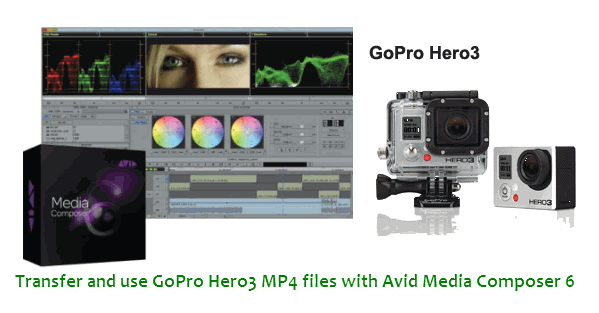
I have been happily using GoPro Hero3 files with Avid Media Composer 5, but GoPro Hero3 files with MC6 lost start-time and it's not ideal for editing work.
We noticed there exist the GoPro Hero3 files with Avid Media Composer 6 problems. Above words are quoted from one of the Hero 3 users. To solve the problem, we searched far and wide. From some users' feedback, we know MC 6 does not support info from GoPro files anymore. While, if you've get the GoPro Here3 files transcoded, Avid just needs to remember where your archived them to maintain a proper relationship. Then, it will be easy for you to edit GoPro Hero3 files in Avid Media Composer 6.
After some testing and QC runs, we decided that it didn't hurt the quality to just transcode the GoPro Here3 video to ProRes Proxy and use the new Quicktimes as the master. For them it was more friendly in FCP environment. If went the somewhat same route but for Avid Media Composer 6, transcode GoPro Here3 video to Avid DNxHD and then fast import them for editing is the best choice.
Preparation: Go to download and install the best Mac GoPro Hero 3 Video Converter
(This video converter comes with the optimal profiles for Avid Media Composer so that you can fast convert GoPro Hero3 H.264 MP4 to Avid MC 6 most compatible format without quality loss)
Tutorial on converting GoPro Here3 video to Avid DNxHD for Avid MC 6 on Mac OS X
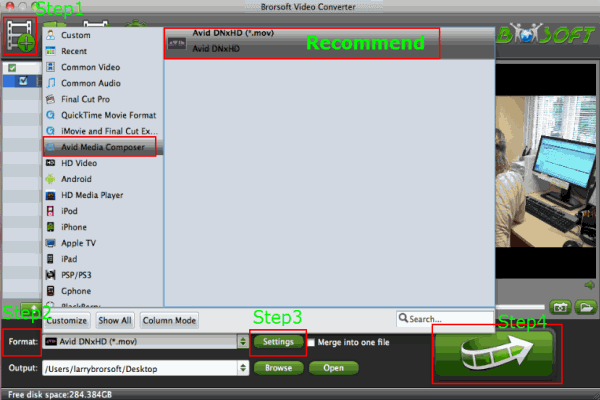
Step 1: Step 1: Launch the recommended AVCHD to Avid MC Converter and then click the adding button to import your 1080p H.264 MP4 files from Hero3 to it. If necessary, you can click the box "Merge into one" to combine several videos to one file.
Step 2: Click Format on the main interface and choose Avid Media Composer > Avid DNxHD(*.mov) as output format.
Step 3: Tap the Settings icon, and you can adjust codec, bit rate, frame rate, sample rate and audio channel in the Profile Setting to get the output in best quality. You are advised to set the video size as 1920*1080 and set the video frame rate as 30fps.
Step 4: Start to convert GoPro Hero3 H.264 footages to Avid Media Composer 6 favorable DNxHD .mov format via hitting the Convert button.
When the 1080p MP4 to Avid MC 6 conversion is 100% completed, you can get the resulted video via hitting on Open button. Moment later, you can transfer GoPro Hero3 1080p MP4 to Avid MC 6 with easy editing. Don't worry about any quality loss.
Tip:
If you meet the GoPro Hero3 MP4 files to Avid Media Composer 6 importing issues on Windows, you can get this Brorsoft Video Converter for GoPro Hero3 to solve the problem.
Related Guides:
How to edit GoPro MP4 files in Final Cut Pro
How to add GoPro 60p MP4 files to Premiere Pro CS6
How to Convert and Import GoPro Video to Pinnacle Studio
Related Products
Video Converter for Mac


Useful Tips
- GoPro Video to Pinnacle Studio
- GoPro Video to Premiere Pro
- GoPro Video to Premiere Elements
- GoPro Video to iMovie
- GoPro Video to FCP X
- GoPro Video to Avid MC
- GoPro Video to Movie Maker
- GoPro Video to Sony Vegas
- GoPro Video to Sony Movie Studio
- GoPro Video to Corel VideoStudio
- GoPro Video to After Effects
- GoPro Video to PowerDirector
- GoPro Video to YouTube
- GoPro 4K in VLC Media Player
- GoPro Studio Alternative
- GoPro Hero6 to YouTube
- GoPro Hero6 on iPhone 7/8/X
- GoPro Hero6 to GoPro Studio
- GoPro Hero6 to Davinci Resolve
- GoPro Hero6 to Pinnacle Studio
- Hero6 to Avid/Vegas/Premeire
Social Connection

Copyright © 2019 Brorsoft Studio. All Rights Reserved.