
- Store
- Products
- Downloads
- Resources
-
 For Mac
 For Windows
 Home » MXF Transcoding Tips » Canon C300 to Avid Media Composer
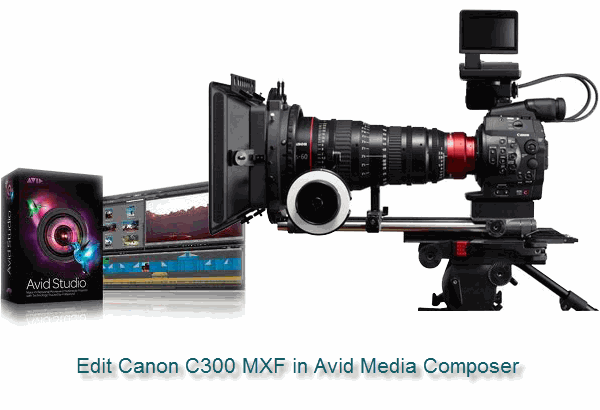
Canon C300 and Avid MC - Editing Canon C300 MXF in Avid Media Composer
Canon EOS C300 brings the expertise and decades of experience in designing sensors, lenses, image processing and design to the world of motion picture capture and meet the needs of cinema industry professionals. It provides outstanding cinema quality movie capture with the revolutionary Canon DIGIC DV III Image Processor and 50 Mbps 4:2:2 codec. But have you met the warn: "Exception: MXFDomain_INIT_FAILD.file::storage:Hoodienrk.mxf" or the error message saying that you can not import the file into a bin while you want to edit Canon C300 MXF in Avid Media Composer? If the answer is positive, you should have spent a lot of time in finding the solution. You may find some AMA plug-ins that is said to make Canon MXF editable in Avid MC, but it seems that the plug-ins needs to be updated time to time and it is really annoying!
If you want to get yourself out of the trouble and meet no problem while importing Canon MXF to Avid MC, you have to find a professional and powerful MXF to Avid DNxHD converter, applying which you can convert and deinterlace Canon C300 1080i MXF to DNxHD, the compatible video format for Avid MC, on Mac OS X without any video and audio problem, thus your Mac and Avid Media Composer can recognize your C300 footages.
According to your requirements, we recommend the MXF Converter to you. It is great in transcoding Canon C300 MXF to DNxHD (MOV) with orginal quality. Besides, it is designed with some useful editing features, including deinterlacing 1080i files, cropping black sides, combining MXF clips into one for easy editing, adding text/video/image watermark to your recordings, etc. Follow the listed guide on MXF to Avid DNxHD conversion, and you can put your MXF footages in Avid MC without any importing problem.
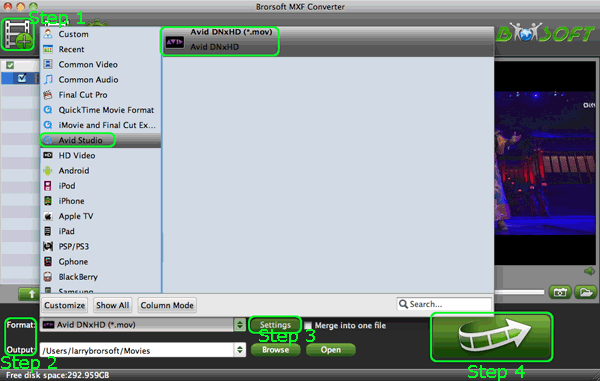
Step 1: Get the MXF Converter for Mac, launch it to add your Canon C300 MXF files;
Tips:
1. If you want to merge MXF files , just need to check the “Merge into one” box.
2. If you record in two audio tracks, please insert your CF cards into your Mac and copy files from CF cards, thus the MXF to Avid DNxHD Converter will convert all the audio tracks.
Step 2: Click on “ Format” and you will get a dropdown menu , then move you pointer to Avid Studio > Avid DNxHD(*.mov).
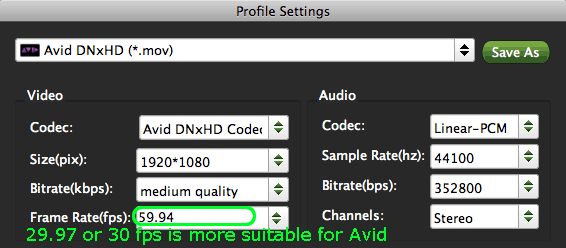
Step 3: Adjust codec, bit rate, frame rate, sample rate and audio channel in the interface in Profile Settings by clicking Settings on the main interface according to your needs to optimize the output file quality. If you have no special requirement, the step can be skipped.
Note: You’d better set the video frame rate as 29.97 or 30 fps, video size as 1920*1080 and select the audio channels as 5.1 channels to keep the best quality for editing in Avid Media Composer, if you are shoot in 60i. But for 50i users, the 25fps is the better option for you.
Step 4: Click the button for "Convert" and you will strat converting/deinterlacing Canon C300 MXF to Avid DNxHD immediately.
When the MXF to DNxHD conversion process with MXF to Avid Converter is 100% completed, you will be able to get the output files for Avid Media Composer by clicking on “import” button effortlessly. In addtion, the MXF Converter for Mac is also good at transferring MXF footages from Canon C300 to Final Cut Pro, including FCP 6/7 and FCP X, FCE, iMovie, Adobe Premiere, etc. You can change your Mac editing softwares without worries about the incomaptibility problem with MXF and your editing software. Please go to the Mac MXF Converter to get more info.
Get more information about converting Canon C300 footages to Premiere/iMovie/After Effects
a. Edit Canon C300 MXF in Premiere Pro
b. Put Canon C300 MXF footages in FCP
c. Make Canon C300 MXF editable in iMovie
d. Import Canon C300 MXF files to Sony Vegas Pro
e. Convert Canon C300 MXF files to After Effects
f. Edit Canon C300 MXF footages in FCE
More Canon MXF Related guides:
Import Canon C500 MXF to Premiere Pro
Import Canon XC10 4K MXF to Avid MC
Import Canon XF105 MXF to Premiere Pro
Convert Canon MXF from CF Cards to FCP
Import Canon MXF to Cyberlink PowerDirector
How to convert MXF to WMV without losing quality
Import Canon XC10 4K MXF to Adobe Premiere Pro
Import C300 Mark II MXF to Avid Media Composer
Related Products
MXF Converter for Mac


Useful Tips
Find us on Facebook

Adwards

Copyright © 2019 Brorsoft Studio. All Rights Reserved.